
How to Publish Your Call
Log in to CaFÉ Admin and go to the Call Editor.
Click Publish Call in the Status section.
Click Send Publish Request.
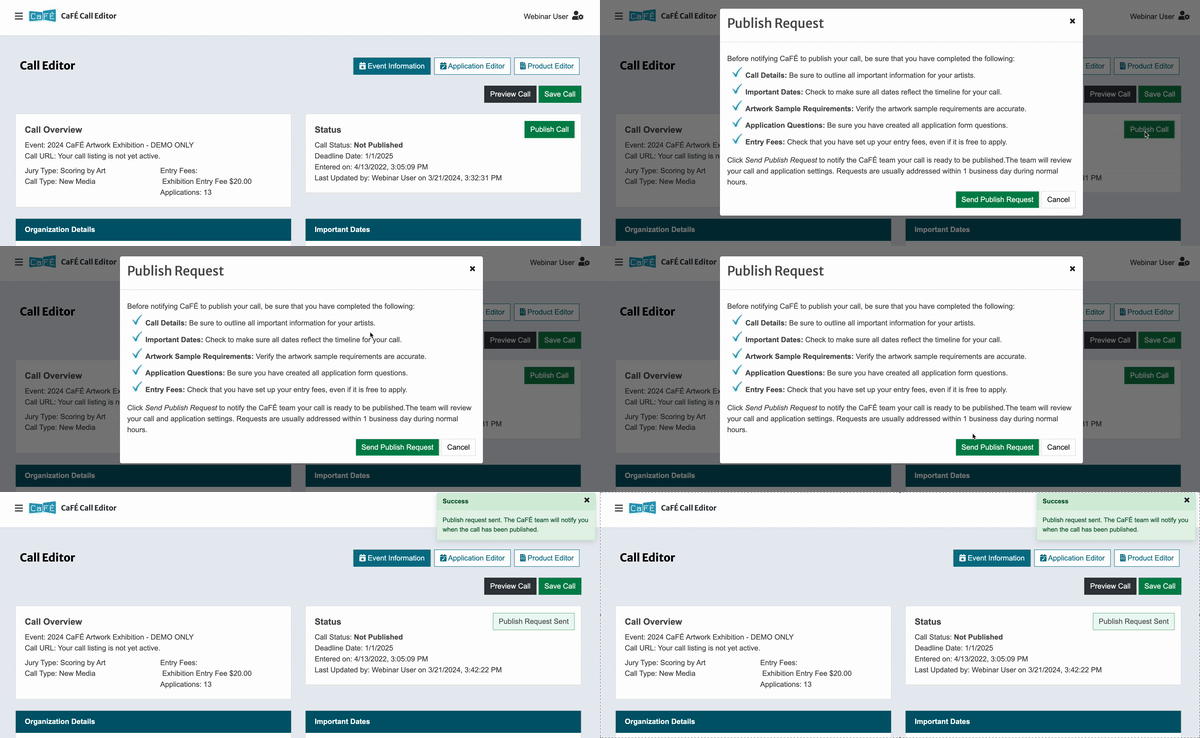
The CaFÉ team will review your call details and application to ensure artists will be able to apply.
Requests are usually addressed within 1 business day during normal business hours, 8:30 a.m. to 5 p.m. Monday through Friday (excluding national holidays).
Please give yourself enough time to edit your call details so it can be published by your intended date.
We will notify you when your call is published.
The Call Status will be updated to Published.
⚠️ Note: Even if your call is published, artists will not be able to apply until your Accept Applications date.
If your Call Status is set to "Pending," we are still waiting on your payment for the call. You must submit payment before we can publish your call (this does not apply to prepaid or auto-deducted fees).