How to Notify Artists of the Jury Results 📣
Log in to CaFÉ Admin and go to Events > Communication. Select the call you want to view from the Current Event drop-down list.
Check the box next to the status or statuses you want to email.
Click Draft Email to open the email form.
Enter your information and craft your message in the body text box.
CaFÉ login: [username]
Medium Category: [medium category, if applicable]
[Status] [Artwork Title]
[first_name] [last_name]:
The system will auto-populate the following fields:
Click Preview to review your draft.
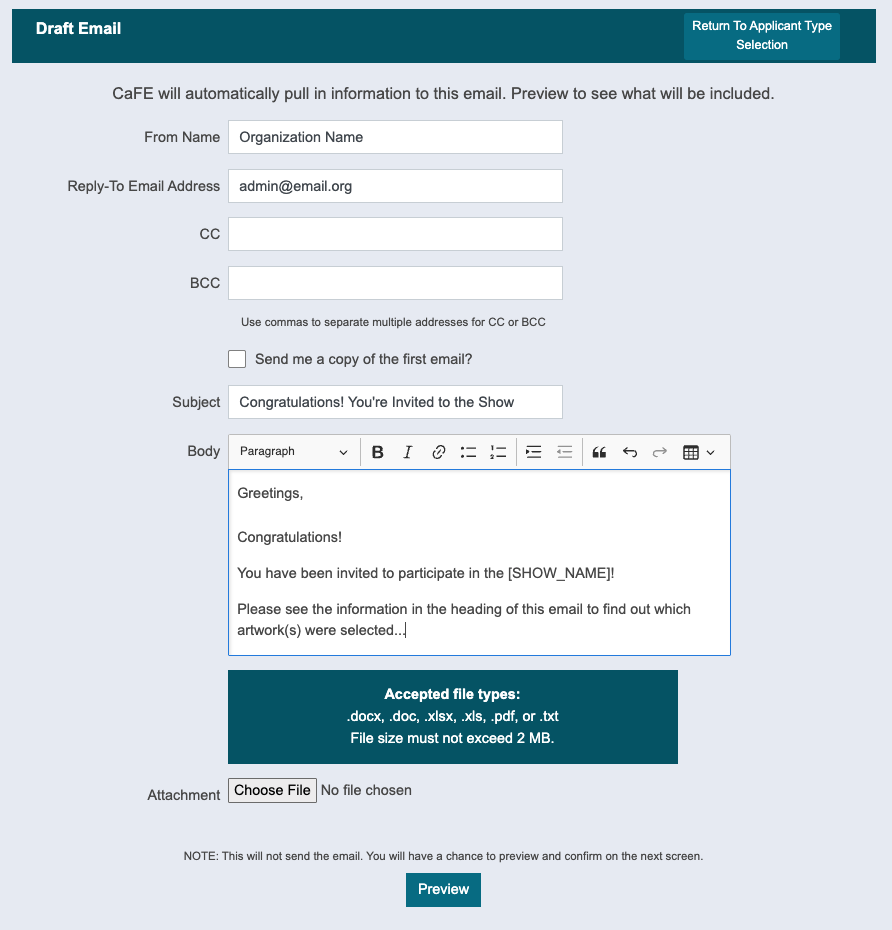
In the Preview, click Go Back and Make Changes 👈 to return to the email form and make changes. Click Save Draft 💾 to save your draft and return to your email message later. Your drafts will be found under the call title in the Events > Communication tab.
When you are ready, click Send ↗️ to send your email.
✨ Once you notify your artists, don't forget to change the Jury Status to Complete!
How to Retrieve a Copy of Sent Emails 📨
Log in to CaFÉ Admin and go to Events > Management. Select the call you want to view from the Current Event drop-down list.
Choose the status of the artist whose message you want to review (Invited, Not Invited) or search for the artist using the search box.
Click on the APP ID#.
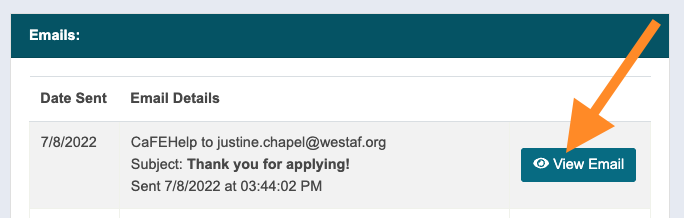
Go to the Emails section on the Artist Application page.
Click on View Email 👁️ to view a copy of the sent email.
⚡ TIP: Run the Communication Bounce Report to check for bounced emails.
