

How to Complete the Jury ⭐
Log in to CaFÉ Admin and go to Jury > Administration. Select the call you want to view from the Current Event drop-down list.
Change the Jury Status to Complete, and click Save 💾 .
How to Download Each Jury Round’s Scoring History 📊
Log in to CaFÉ Admin and go to Jury > Administration. Select the call you want to view from the Current Event drop-down list.
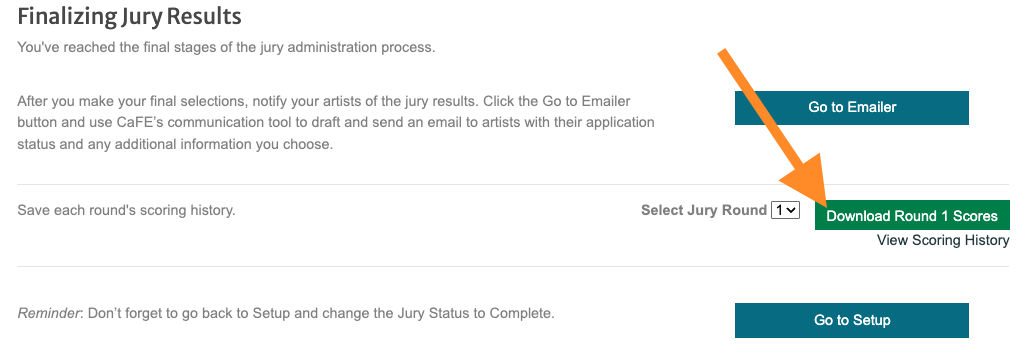
Click Finalize and select the Round from which you want to download the scores.
Click Download Scores to download a spreadsheet of scores from your selected round.
To see the scoring history per round without downloading, click View Scoring History and select the round of scores you wish to view.
⚡ TIP: Download the scoring history to review individual juror feedback or maintain a record of your jury's decisions for future reference and insights.
How to Archive Your Call 🗄️
Contact CaFÉ Support and request that your call be archived.
A member of the CaFÉ team will archive it for you.
To view archived calls, go to the Archived Events drop-down menu on Events > Management.
⚡ TIP: Archiving your call allows you to keep the list of current calls up-to-date. Archive your call after your jury is complete, you’ve notified the artists of the results, and the high-resolution images are downloaded (if needed).
