
How to Check for Bounced Emails 🚫
Log in to CaFÉ Admin and go to Reports > Events Communication Bounce Report.
Click on the Select Events dropdown menu and select the call(s) you wish to include, or click Select All Events.
Choose the Date Range to include when you sent your email(s).
Click Run Report to see the list of bounced emails.
If no bounces are reported, you will see the message: No reports found.
Click Download Report to download a CSV file of the report.
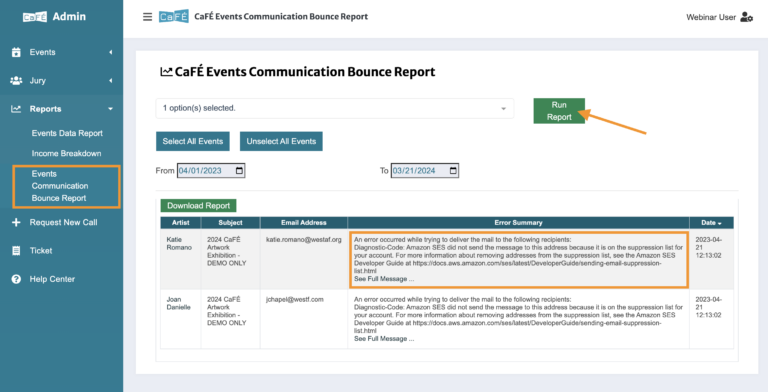
Emails may “bounce” for several reasons, including full mailboxes, issues with the artist’s email provider, or if the artist closed that email account. If you see any bounces reported, try contacting the artist by phone and have them check the email address in their CaFÉ account.