

How to Sort Applications
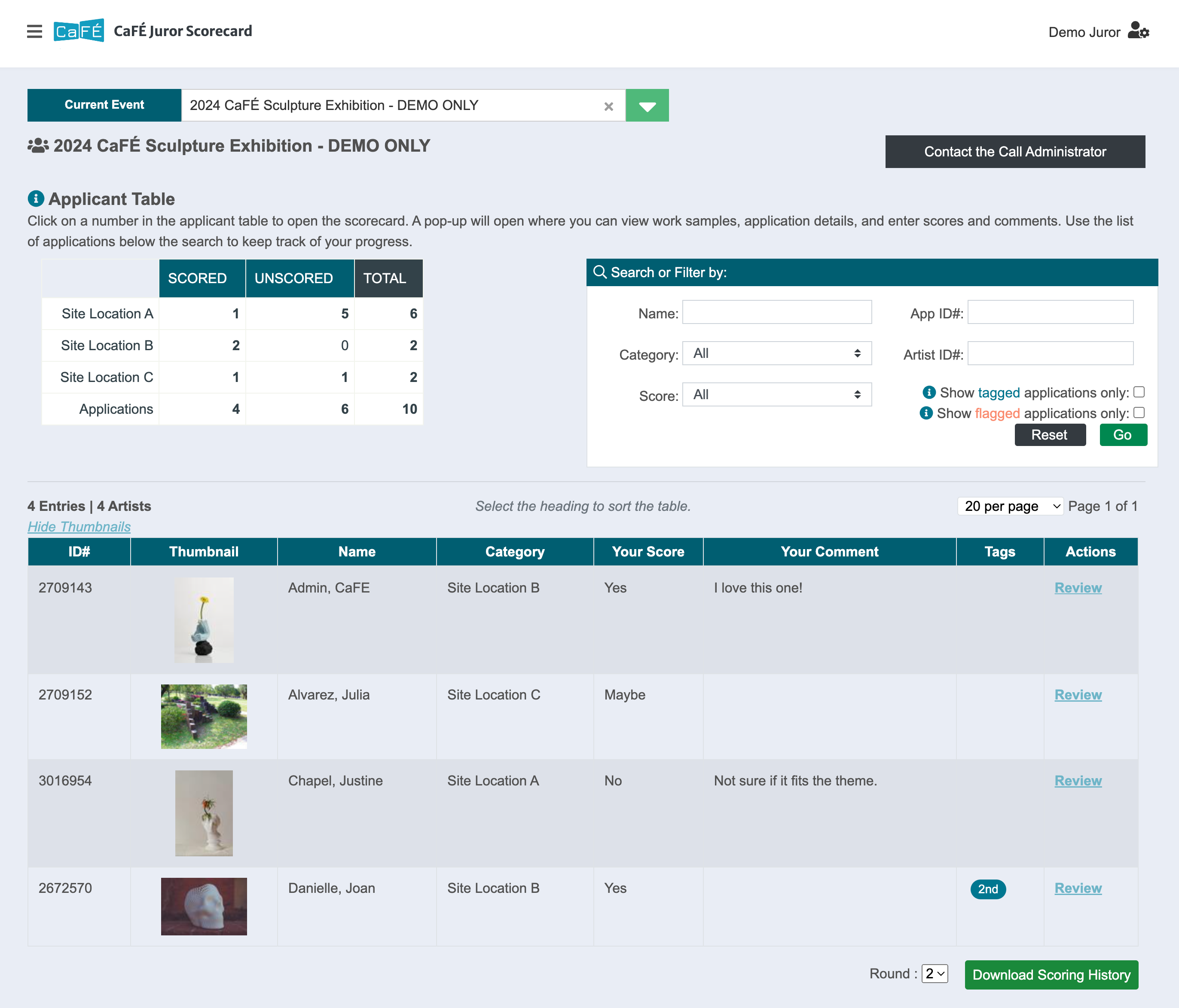
Click on the number of entries you wish to view from the Applicant Table. The table of applications will appear on the page below.
Click on the heading of any column in the table of applications to sort ascending (A to Z). Click again to sort descending (Z to A).
Select a score in the Filter by Score drop-down menu to display only the applications with your chosen score.
Use the Search or Filter By box to find applicants by Name, App ID#, or Artist ID#, or filter the table of applications by Category, Score, Tags, or Flags. Click Reset to clear search results and filters.
How to Download Scoring History
⚡ TIP: Want to reference your scores and comments from Round 1 while you're in Round 2? Download the scoring history from Round 1 for easy reference.
Select the number from the table to view the table of applications on the same page.
At the bottom of the table, choose the jury Round and click Download Scoring History to download a spreadsheet of your scores.
